NyxINS
2025-11-07
Project repositoryOverview
NyxINS is a project I started to get some hands on experience with sensor fusion and to potentially explore some more advanced PCB design challenges. What I want to achieve with Nyx is I want to see how accurate can I make an INS system that is built with consumer grade components. My general idea here is to employ multiple identical IMU sensors in different orientations, encapsulated in a temperature controlled environment.
I'll be adding more here as I develop the project.
Micro shell
Anticipating future need for access to the device while it's running, modifying values without constant reflashing I developed a simple, lightweight shell library with a completely static memory footprint. It's completely platform agnostic, OS/non-OS, doesn't matter, I was testing it on my Linux machine. It only requires you to provide implementation for two abstractions:
void shell_putc(const char c)
{
    // Put single character to the interface
}

int shell_getc()
{
    // Get single character from the interface
}
This allows you to define the shell on any interface you need, be it USB, UART or stdout/stdin on a Linux (altough this is probably useless) or others. You define the commands like this:
shell_state_t state = device_shell_get_default_state(); // Get default config

shell_command_t commands[] = { // Define command array providing function pointers
    {"foo", foo, "Foo command"}, // Command name, function pointer, help string
    {"bar", bar, "Bar command"},
    {"dead", dead, "Dead command"},
    {"beef", beer, "Beed command"},
};

uint8_t num_commands = sizeof(commands) / sizeof(shell_command_t);

state.shell_commands = commands; // Assign the array and it's size
state.num_commands = num_commands;
And that's it, you just need to include the following in your main program loop:
device_shell_parse(&shell_state)
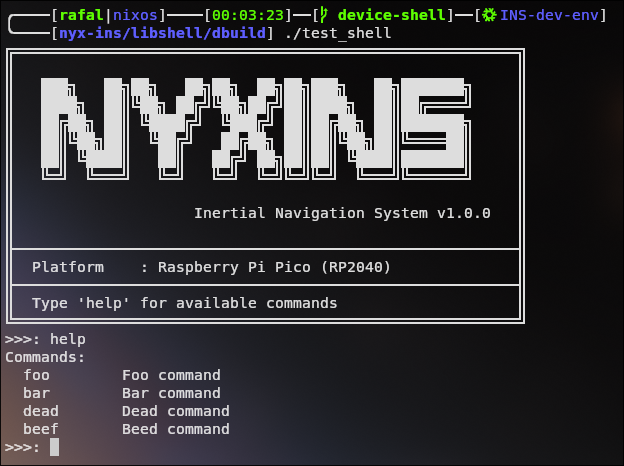
If initialized properly, you get an automatic help command. The shell also has a weakly defined function that gets called on the first clear of the buffers (at initialization). Because it's weakly defined you can override it with a custom implementation to print a banner on init, run whatever you need when the shell is created:
void shell_greeting_hook()
{
    const char* banner[] = {
        "╔════════════╗\n",
        "║   BANNER   ║\n",
        "╚════════════╝\n"
    };

    for(int i=0; i<sizeof(banner) / sizeof(banner[0]); i++)
    {
        shell_puts(banner[i]);
    }
}
Here is the shell running on my Linux machine from a test binary, the interface is just set to stdout/stdin.
I think this itself is modular and useful enough to be migrated to a separate repository. I will likely reuse this component in my other projects.